Registrations at Bolo Up Agency are open now. Whether you want to become an agent or a host, now it’s the time to get started. Build your team, grow your network, and explore exciting features on the BoloUp app.
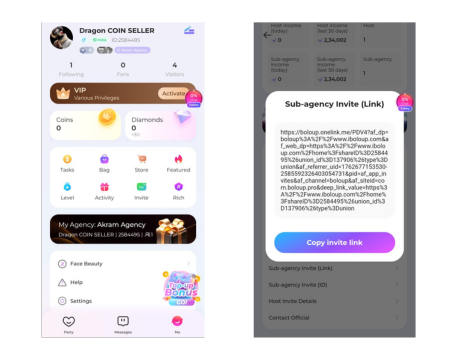
Copy the invitation link and share it with your invitee.
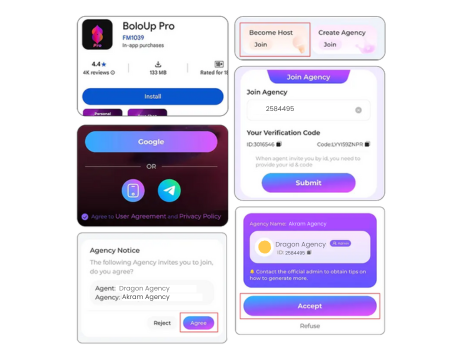
The sub-agent will click on the link and download the app.
After signing in, a pop-up will show on the screen with a request to join the agency. Accept the invitation to join.
Method - 2:
Open agency dashboard.
Select the option of “Sub-agency Invite (ID)”.
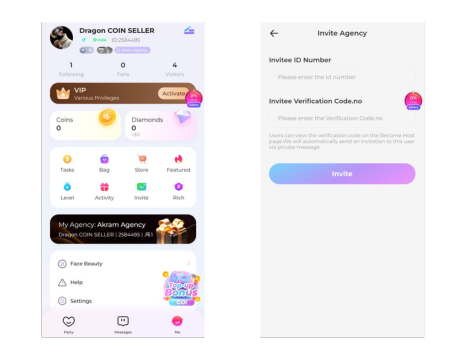
Enter the ID number, the invitee verification code, and send the invite.
The sub-agent will download the app and will share the ID (available in the profile section) and verification code (in the profile section, under create agency).
The sub-agent will receive a request from the agency. They need to accept the invitation to join.
How to invite Hosts under your agency
Method - 1:
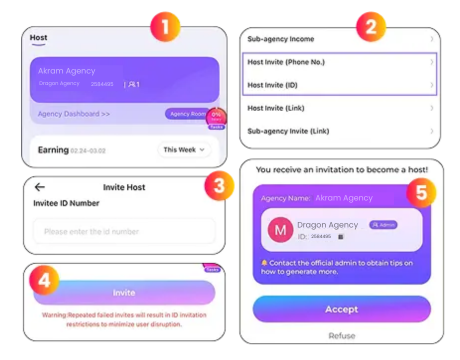
Open agency dashboard.
Select the option of “Host Invite (ID / Phone No.)”.
Enter the Host ID or phone number.
Confirm the host profile. And click “Invite”.
The host will receive a request from the agency. They need to accept the invitation to join the agency.
Method - 2:
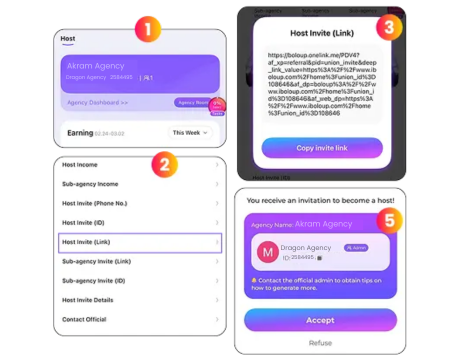
Open agency dashboard.
Click on the “Host Invite (Link)”.
Copy the invite link and share it with your host.
The host must download BoloUp and create an account to become your host.
After signing, the host will receive a request from the agency. They need to accept the invitation to join the agency.